Invite your team and choose roles
Give your manager, your business partner or your agency access to the portal, with the permissions each one needs.
Leitura: 4 minAtualizado a 11 de novembro de 2026
Este guia ainda não está no seu idioma: mostramo-lo em inglês.
You don't have to do it all yourself. Invite your team by email and decide what each person can do at each location.
Before you start
- The location must be verified in your name.
- The owner and people with the Admin role can invite.
What you'll get: everyone signs in with their own account and only sees what they need.
Roles
| Role | What they can do |
|---|---|
| Owner | Everything, including claiming and transferring the listing. It's the person who verified it. |
| Admin | Everything except owning the listing, including the team. |
| Manager | Edits the listing, events and jobs, and sees applicants, sign-ups and stats. |
| Viewer | Read only. |
Steps
In the menu, tap Settings.
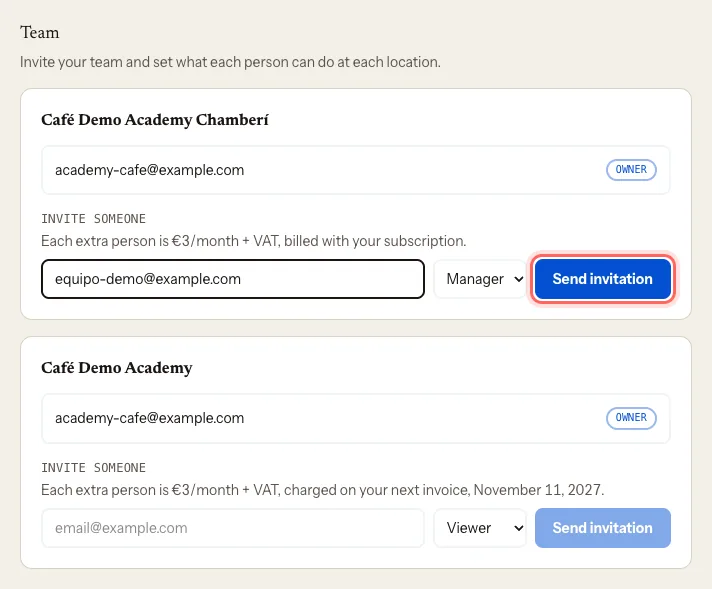
Scroll down to Team. You'll see a card for each location you manage.
On the location's card, go to Invite someone.
Enter the person's email and pick their role: Admin, Manager or Viewer.
Tap Send invitation.
What happens next
- The person gets an email with a link to join. They sign in with that same email and accept.
- Until they accept, they show as Pending. You can Resend the email, Copy link to send it another way, or Revoke the invitation.
- To change someone's role, use the drop-down next to their name.
- To remove someone, tap Remove and confirm.
Troubleshooting
I get a message when I invite someone. Your account may not allow adding team members yet. The portal shows you the options you have; if it isn't clear, write to us at mycoffee.guide/contacto.
I get "Verify a location to invite your team". You don't have a verified location yet. Finish verifying it: Claim your coffee shop.
The person says the invitation isn't for them. They need to sign in to the portal with the same email you invited.
Este guia foi útil?
Próximo passo
Show the coffee you serve and turn on the roaster roleSay whose coffee you brew and, if you roast, publish your catalogue and the coffee shops that serve it.Guias relacionados
- Manage several locationsRun all your coffee shops from one account and switch between them in a click.
- Claim your coffee shopProve you run your coffee shop and start editing its listing on My Coffee Guide.
- Edit your listing: photos, hours and featuresUpdate your coffee shop's description, photos, opening hours, contact details and features.