Track your applications
See in your account which jobs you've applied to and, if the coffee shop shares it, where each application stands.
Leitura: 2 minAtualizado a 11 de novembro de 2026
Este guia ainda não está no seu idioma: mostramo-lo em inglês.
Every application you send through the My Coffee Guide form is saved in your account.
Before you start
- You need to have applied to at least one job through the My Coffee Guide form. Applications sent on a company's own website don't show here.
What you'll get: a quick view of what you've applied to and when.
Steps
Go to mycoffee.guide and open My account.
Scroll down to the Jobs section.
Each row is one application, with the job and the date under Applied on.
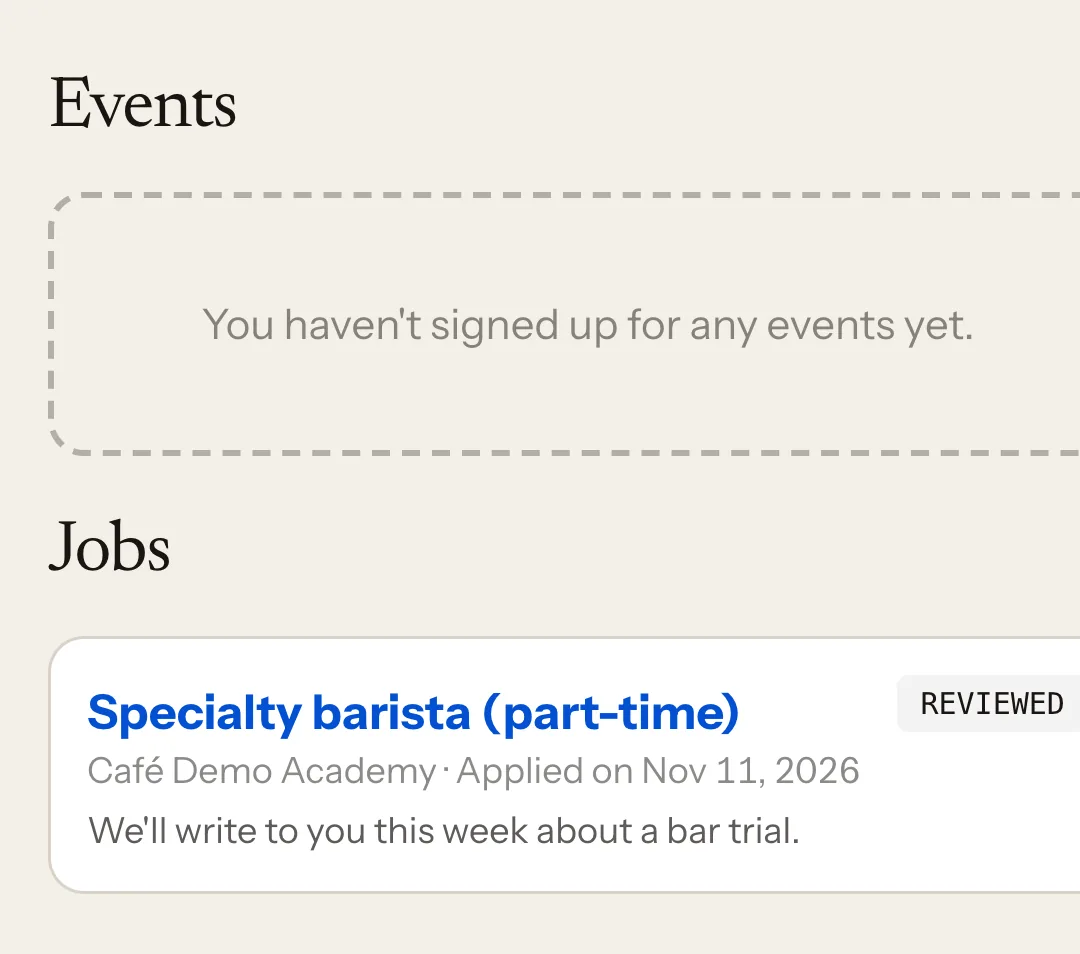
Tap the job to open it again.
Your application status
Some coffee shops share where your application stands. If they do, you'll see one of these, sometimes with a note:
- Sent: it has reached the coffee shop.
- Reviewed: the coffee shop has read it.
- Contacted: the coffee shop has emailed or called you.
- Not selected: you're not moving forward this time.
If the coffee shop doesn't share the status, the row only shows the date. That doesn't mean they haven't seen it.
What happens next
The coffee shop contacts you directly by email or phone. You don't get a notification when the status changes: check My account from time to time.
Common issues
An application is missing. If the job sent you to the company's website, the application is handled there and isn't saved in your account.
The job no longer opens. The coffee shop has taken it down. Your application stays in the list, but without a link.
I want to withdraw an application. You can't do it on the website. Write to the coffee shop to let them know.
Este guia foi útil?