Add a missing farm and invite it
If the farm behind one of your coffees isn't in the guide, add it and send its owners an invitation to manage it.
読了時間:3 min2026年11月11日 更新
このガイドはまだお使いの言語に対応していないため、英語で表示しています。
Every coffee in your catalogue needs its farm. If it isn't in the guide, you can create it in a minute, then invite the people who run it to manage it.
Before you start
- Search carefully first: the farm may be listed under another name (the producer's, or the co-op's). Creating it twice breaks the chain.
- Have to hand the farm or producer name, the country and the region.
- To invite the farm, you need a contact email for it.
What you'll get: the farm in the guide, linked to your coffee, and an invitation for its owners to take over their page.
Steps
1. Add the farm
In Our catalogue, tap Add a coffee.
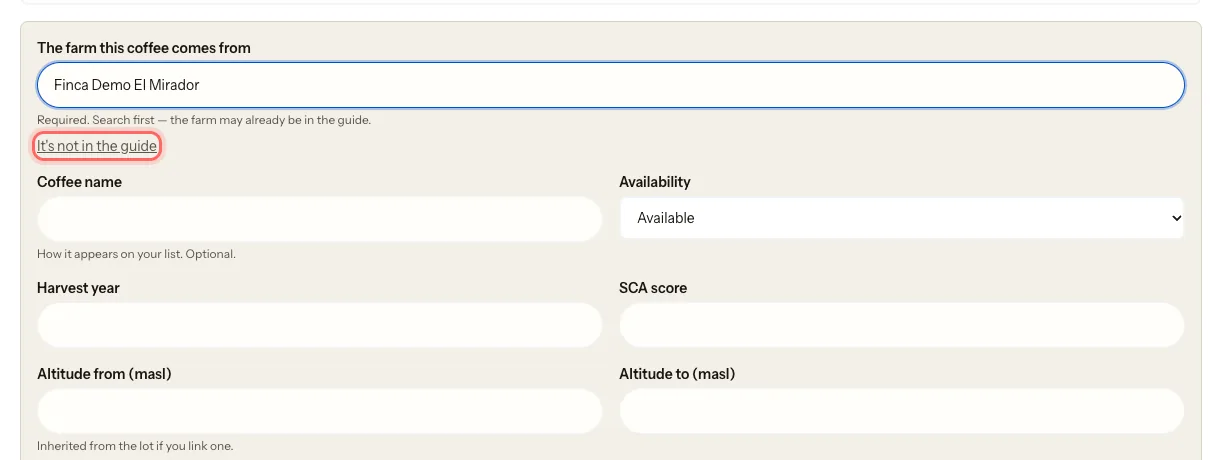
Under The farm this coffee comes from, search for the farm. If it doesn't show up, tap It's not in the guide.
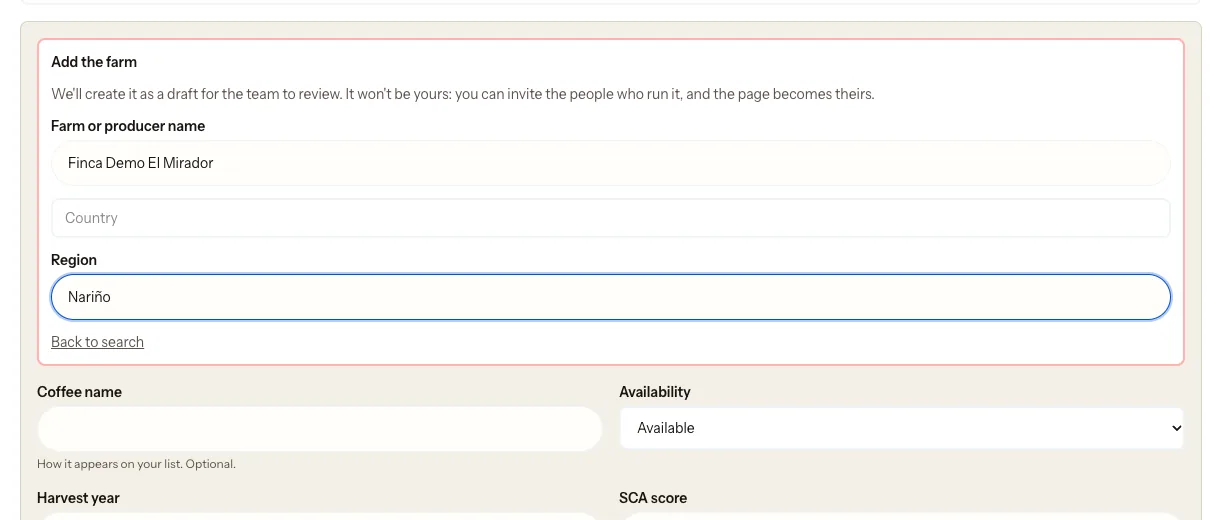
Under Add the farm, fill in Farm or producer name, Country and Region.
Fill in the rest of the coffee and tap Save coffee. See Add a coffee to your catalogue.
You'll see We've added {name} to the guide. The farm starts as a draft and our team reviews it. It isn't yours: your coffee is linked to it, but the page belongs to the farm.
2. Invite the farm to claim it
- Below the notice, or on the coffee's card, tap Invite them to claim it.
- Type the farm's email address.
- Under Email language, choose the one the farm reads best. It starts with the language you use the portal in.
- Tap Send the invitation. You'll see Invitation sent to {email}.
What happens next
- The farm gets an email, Claim {name} on My Coffee Guide, saying your company added it to the guide.
- If they accept, they manage their page from then on: the farm, its lots and who they sell to. You keep your catalogue.
- The invitation expires after 30 days. You can send it again from the coffee's card.
- The Invite them to claim it button stays on the card for as long as the farm has no owner.
Common issues
"This farm already has an owner, so there's nothing to invite them to." Someone already manages the farm. There's nothing you need to do.
"The invitation exists, but the email didn't go out." Tap Send the invitation again.
The email reached them in the wrong language. Send it again from the coffee's card and choose a different Email language.
I created a farm that already existed. Write to us at mycoffee.guide/contacto and we'll merge them.
このガイドは役に立ちましたか?