Request a name change
Our team changes your company's name. Ask for it in the portal and follow the answer.
Lecture : 2 minMis à jour le 11 novembre 2026
Ce guide n’est pas encore disponible dans votre langue : nous l’affichons en anglais.
The name identifies your company across the whole guide, so we check it by hand before changing it.
Before you start
- You need to be the verified owner of the profile.
- Know the exact form of the name, with its capitals and accents.
What you'll get: a change request that our team reviews.
Steps
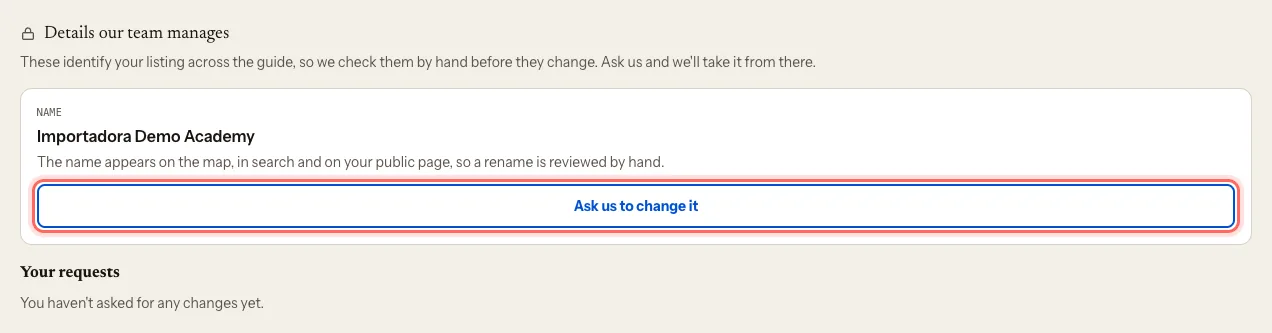
In your company's dashboard, scroll down to Details our team manages.
Next to Name, tap Ask us to change it.
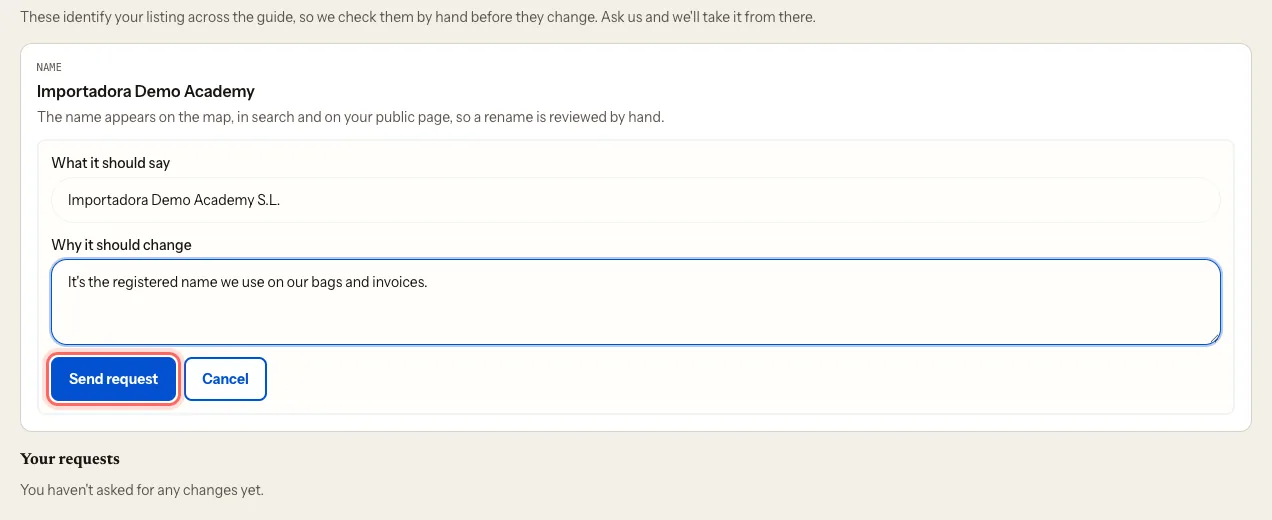
Under What it should say, type the correct name.
Under Why it should change, tell us why: a rebrand, a typo… whatever helps us check it.
Tap Send request. You'll see Request sent. Our team will review it.
What happens next
- The request appears under Your requests as Pending.
- Once we've reviewed it, it changes to Approved or Rejected, with Our answer if needed.
- While it's pending, you can tap Withdraw request.
- If we approve it, your page's address changes with the name. Old links still take people to your page.
Common issues
I want to change the country. You can't request it here. Write to us at mycoffee.guide/contacto and we'll change it.
I can't see "Details our team manages". It appears once the profile is yours. If your claim is pending, wait until we've confirmed it.
Ce guide vous a-t-il aidé ?