Request a name change
Our team changes your farm's name. Here's how to ask.
읽는 시간: 2 min2026년 11월 11일 업데이트
이 가이드는 아직 사용하시는 언어로 제공되지 않아 영어로 보여드립니다.
The name appears on the map, in search and in your page's address. That's why we check it by hand before changing it.
Before you start
- The farm must be yours and verified.
- Know the exact name and why it's changing: a new name, a typo, the producer's name instead of the farm's…
What you'll get: our team receives your request and answers you in the same dashboard.
Steps
Open your farm's dashboard.
Find Details our team manages.
Next to Name, tap Ask us to change it.
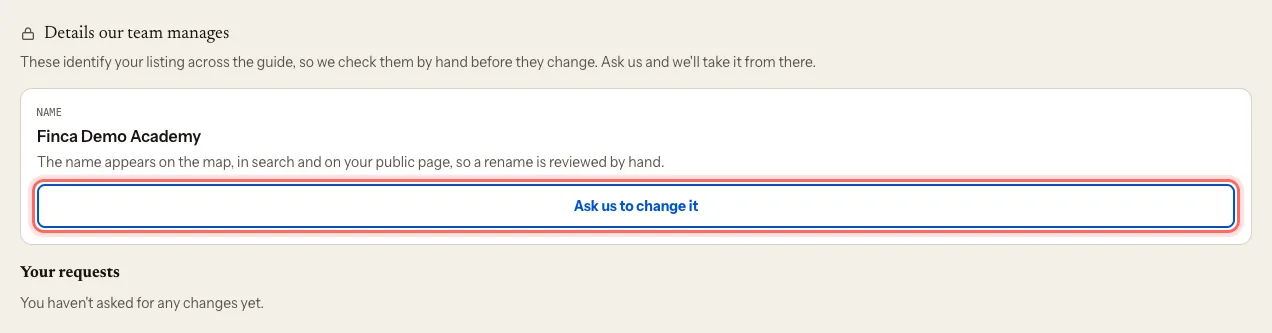
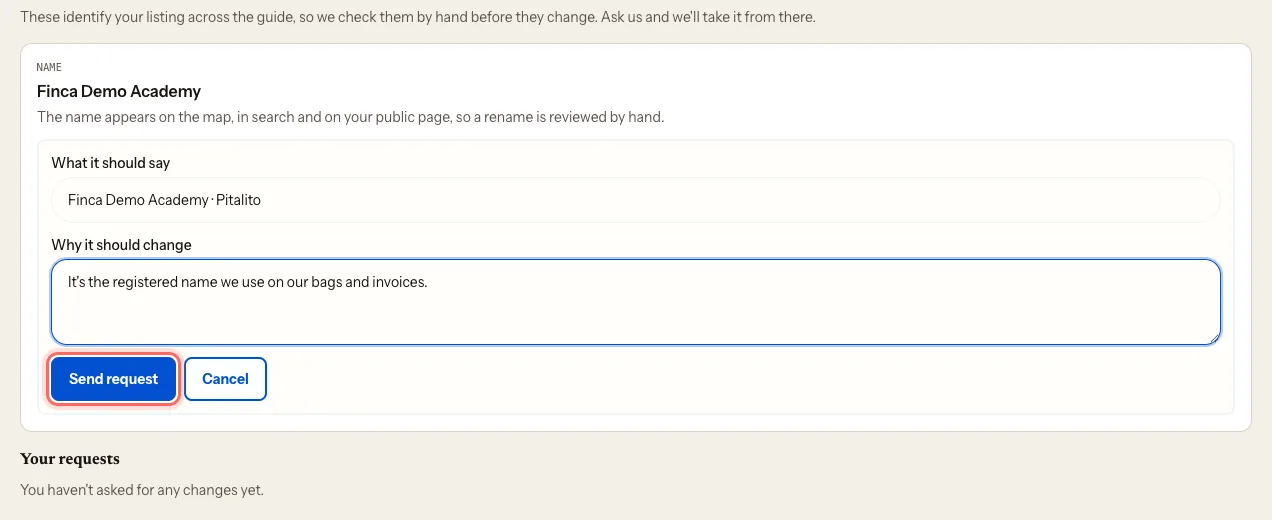
Under What it should say, enter the new name.
Under Why it should change, tell us the reason.
Tap Send request. You'll see Request sent. Our team will review it.
What happens next
- Your request shows under Your requests as Pending.
- Once we've reviewed it, it changes to Approved or Rejected, with Our answer.
- If the name changes, your page's address changes too. We make sure old links still lead to it.
Common problems
I made a mistake in the request. While it's pending, tap Withdraw request and send a new one.
I want to change the country. Only the name can be requested here. For the country, write to us at mycoffee.guide/contacto.
I see "You already have a pending request for this". Wait for our answer to the one you already sent.
이 가이드가 도움이 되었나요?